Astory turns source code and pull requests into architectural change intelligence: see your system, understand what changed, and check whether the change satisfies your intended architecture.
Start with a live scan of one repository. The force graph turns applications, components, endpoints, and cloud systems into a readable chapter of your codebase.
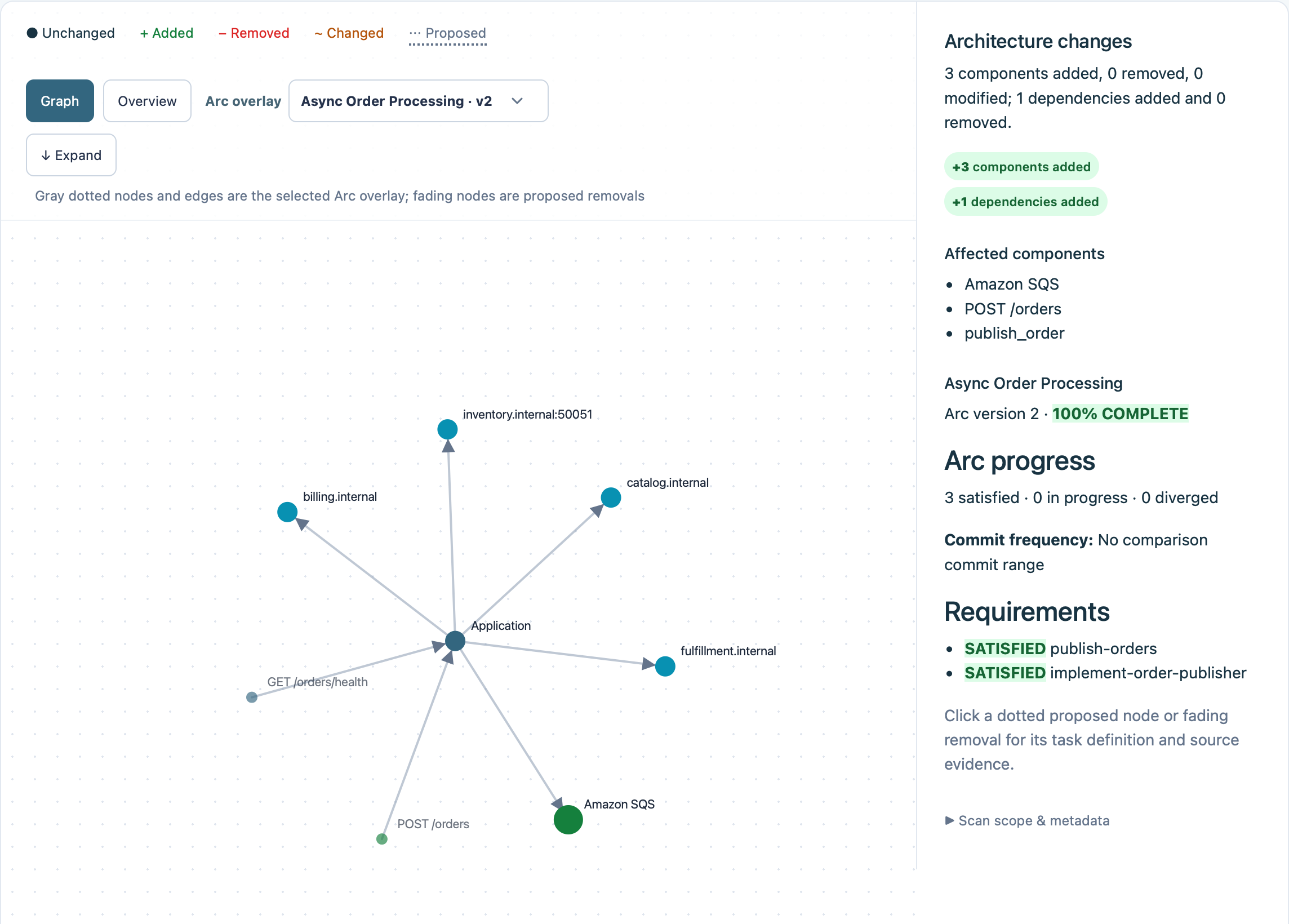
Green adds, red removes, and amber marks changed dependencies.
EDITS
Make architectural change visible.
Compare commits or a pull request to see which services, dependencies, APIs, and resources were added, removed, or modified—not just which files moved around.
An Arc describes the architecture you intend to build and the requirements for getting there. Astory compares it with your repository and pull request, so you can see what is implemented, what has diverged, and what still needs evidence.
Compare intended architecture with observed code and inspect each requirement’s implementation state.
REREAD
Keep a continuous view of change.
Signed GitHub pull-request webhooks scan changes as they arrive. Open a prepared Catch up view with the summary and graph waiting for you—without manual architecture documentation.
Open the next change with its summary and graph already prepared.
CONNECT TO GITHUB
Get started with Astory
Sign in with GitHub, install the Astory GitHub App, and choose your repositories. Scan your architecture, then get updated architecture comparisons automatically as pull requests change.